Listings and imagesLesson 4 of 5
Etsy listing and sales: improve images, create templates and publish
Sir Zafar's Class 15 on reviewing listings that get views but no sales, improving images and copy, making Canva templates, choosing a category and publishing products.
- Status
- stable
- Trust
- human-reviewedHuman: Ahmed Raza ·
This document records Class 15 of the Etsy module, Listing and Sale, taught by Sir Zafar.1
When a listing gets views but no sales
The class treats incoming shop views as a sign that keyword research and the title are working. If sales are still missing, it points to the listing image and description, and describes the problem as low click-through rate (CTR). Review the images and description first.1
This is the class's diagnostic shortcut, not a measured conclusion about a particular listing. The supplied notes do not include click or conversion data that would establish which part of the listing caused the missing sales.
Review products that are not selling
- Give ChatGPT the URL of your product that is not selling and the URL of a competitor's product.
- Ask it to analyse both listings and suggest a better title, description and image or mockup ideas based on the competitor's presentation.
- Use competitor links again when asking for title and description ideas, and give ChatGPT your Etsy workflow and preferences so its suggestions fit your shop.1
ChatGPT can also generate product images and mockups. The class recommends finishing these in your own Canva account, whether free or paid, rather than using an entirely AI-generated image as the final listing image. Edit the image, add your shop logo or other personal elements, and make the result fit your product. Name the image file after the product's main name.1
The class says AI-generated images do not rank well and suggests a screenshot or Canva edit to remove the AI look. The supplied material provides no ranking evidence or platform rule for that claim; keep it as the instructor's advice, not a guaranteed ranking method.1
Create and deliver a digital template
The source file is the file the buyer pays to receive. For a keyword such as "invoice template", search Etsy for that keyword and share the search URL with ChatGPT. Ask for a Canva-editable file, using Etsy and Canva plugins if available in your setup. Open the resulting file in Canva and edit it. 1
Create a Canva template link for the finished product. Design a Thank You Card and place the template link in that card for the buyer; this is how the class describes delivering the editable template.1
The notes do not establish which ChatGPT plugins are available or whether a search URL alone can produce an editable Canva file. Check the resulting file and template link before listing or delivering them.
Choose a category and start listing
If you are unsure which Etsy category to use, search your keyword, open a top listing and look at the last category in its category path. Use that category for your listing if it fits your product.1
Then start creating the products you can make and publish normal listings for them. Keep improving as you learn from the listings.1
Class infographic
Class infographicTap the image to zoom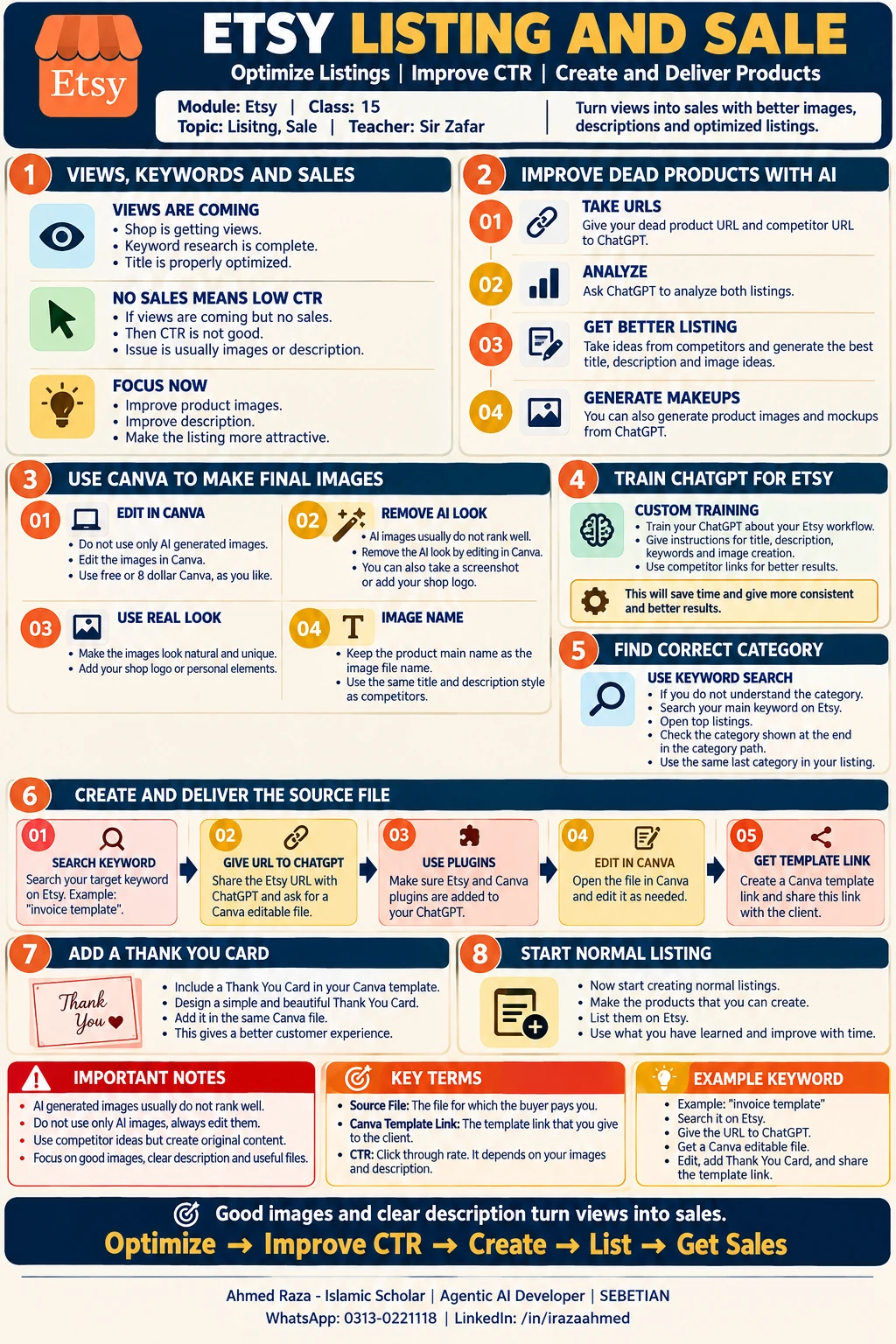 Etsy listing and salesOpen full size
Footnotes
More in this chapter4
- LessonEtsy SEO: the ranking formula, keyword layering, and writing the title, tags and descriptionSir Zakria Afzal's Etsy SEO class, the visibility plus clicks plus sales ranking formula, layering low, mid and high competition keywords, and building the title, 13 tags and description from the top 10 competitors with ChatGPT.Read lesson
- LessonCreating an Etsy listing, from final SEO to publishSir Zakria Afzal's Listing Creation class, finalizing the title, description and tags, the order to pick tags in, and each step of building the listing from photos to price, plus shop sections.Read lesson
- LessonEtsy listing and shop overview: brand identity, listing health and growth habitsSir Zafar's Class 14 on Etsy brand identity (banner, logo, shop name), what to do when a listing gets no views, using search terms as your pillars, sharing every listing, and the shop rating and conversion benchmarks.Read lesson
- LessonEtsy Listing Image Cropping & Safe-Zone Workflow — Orvessira Case StudyOrvessira's owner-approved Etsy listing image canvas, crop checks, visual identity and production workflow, distinguished from Etsy rules and AskSEO course advice.Read lesson
Etsy listing and shop overview: brand identity, listing health and growth habits
Sir Zafar's Class 14 on Etsy brand identity (banner, logo, shop name), what to do when a listing gets no views, using search terms as your pillars, sharing every listing, and the shop rating and conversion benchmarks.
Etsy Listing Image Cropping & Safe-Zone Workflow — Orvessira Case Study
Orvessira's owner-approved Etsy listing image canvas, crop checks, visual identity and production workflow, distinguished from Etsy rules and AskSEO course advice.