Grouping and site structureLesson 1 of 3
Content and site planning, Class 3: from an approved niche to launch
Sir Tanveer Nandla's iSkills SEO Class 3 on keyword grouping, preparing ten articles, staging and hosting, choosing WordPress or a custom site, and launching with a strong user experience.
- Status
- stable
- Trust
- human-reviewedHuman: Ahmed Raza ·
This chapter records Class 3 of the iSkills SEO module, taught by Sir Tanveer Nandla. The class moves from niche and keyword research into content preparation, site building and launch.
Where the class starts
The earlier work was niche research, followed by keyword research and grouping. The next question is how to turn that foundation into a useful website. Sir Tanveer says confusion causes many failures, so work through the steps calmly. He expects more tasks to be automated with AI, but says Claude or ChatGPT will help most when the person guiding them understands the SEO basics and supplies accurate information.1
He describes an approved niche as 70% of success. This is his way of stressing the importance of niche selection, not a measured success rate or guarantee. Do not rush this stage. For someone completely new, he suggests starting with comparatively less serious niches such as APK, government-program or menu topics, which he considers easier to rank.1
Group keywords, then prepare the content
For keyword grouping, the class names Google Instant / Autocomplete and the NicheSpark Chrome extension. If those methods feel difficult, use competitors' pages to collect and organise keyword ideas. The previous Class 2 on competitor keywords and grouping explains that workflow.1
Class 3 launch rule: have at least 10 articles ready before launching the website.1
That is the threshold given in this class. An earlier launch-plan chapter gives 3 articles as a minimum pre-launch option and 10 as a fuller launch. The lessons therefore set different minimums; this chapter keeps the 10-article instruction for Class 3 rather than treating the two figures as identical.
Prepare hosting and the domain
Sir Tanveer says the course will provide Hostinger hosting at no cost to students, while students must buy their own domain. His proposed workflow is to build on a Hostinger staging site first, test and finish the site there, and publish it only when it is ready. He calls the setup "AI Native" but the supplied notes do not define that term. 1
The class also promises an offshore-hosting alternative for niches or sites that Hostinger does not host, with the details to be explained later. These are course offers and future instructions, so the notes do not yet specify eligibility, availability or setup steps. 1
Choose WordPress or a custom site
| Option | How the class describes it | When Sir Tanveer suggests it |
|---|---|---|
| WordPress | A content management system (CMS) that the course will teach. | Wait for the WordPress lessons if you cannot yet build and manage a custom site. |
| Custom site | A site built through "vibe coding" with AI-assisted tools. | Start now if you can build a site for your niche and manage it afterward. |
Sir Tanveer prefers a custom site when the learner has the ability to build and maintain one, because it offers more flexibility for changes. He says a basic custom site can be built in around 2 hours, but the building tool may still be needed whenever the site needs changes. The 2-hour figure is a class example, not a delivery estimate for every site.1
A strong custom site needs more than its public-facing front end. It should also have a back end or admin panel where articles and other content can be managed. The class presents a tool that manages the front end through the admin panel as an opportunity to build. Sir Tanveer also mentions Hostinger's MCP as a way to let Claude or ChatGPT make changes; the notes do not contain a setup demonstration. 1
Build on staging, then launch
The class's proactive sequence is:
- Finish the niche and keyword groups.
- Prepare at least 10 articles.
- Build the site on staging.
- Complete and test the content, design, admin workflow and other site requirements.
- Make the complete site live when it is ready. 1
The aim is to give visitors a useful experience from the start, rather than publish a site whose core content and functions are still missing.
The class's “honeymoon period” explanation
Sir Tanveer calls a new site's possible initial visibility a honeymoon period. In his explanation, Google tests how users experience the site, then a correction period follows: a helpful site may stay visible, while a poor experience may lose rankings. He uses sandbox for a severe drop and urges students to make the site top-notch before launch so they can use any early opportunity well.1
Important
Treat “honeymoon period,” “correction period,” a guaranteed initial boost, and “sandbox” here as the teacher's explanatory model, not confirmed stages or guarantees in Google's published ranking guidance. Google describes many ranking signals, encourages helpful content and a good page experience, and says a new site may simply take time to be crawled and indexed. A strong launch is worth preparing, but it does not ensure an artificial ranking boost. 234
Reference left open by the notes
The class notes and both infographics show Workar.com, but do not say what it is for or give an action to take there. Its role in this workflow remains an open question.1
Class infographics
These reproduce the class's teaching. Use the Google guidance note above when interpreting the graphics' honeymoon and sandbox claims.
Class infographicTap the image to zoom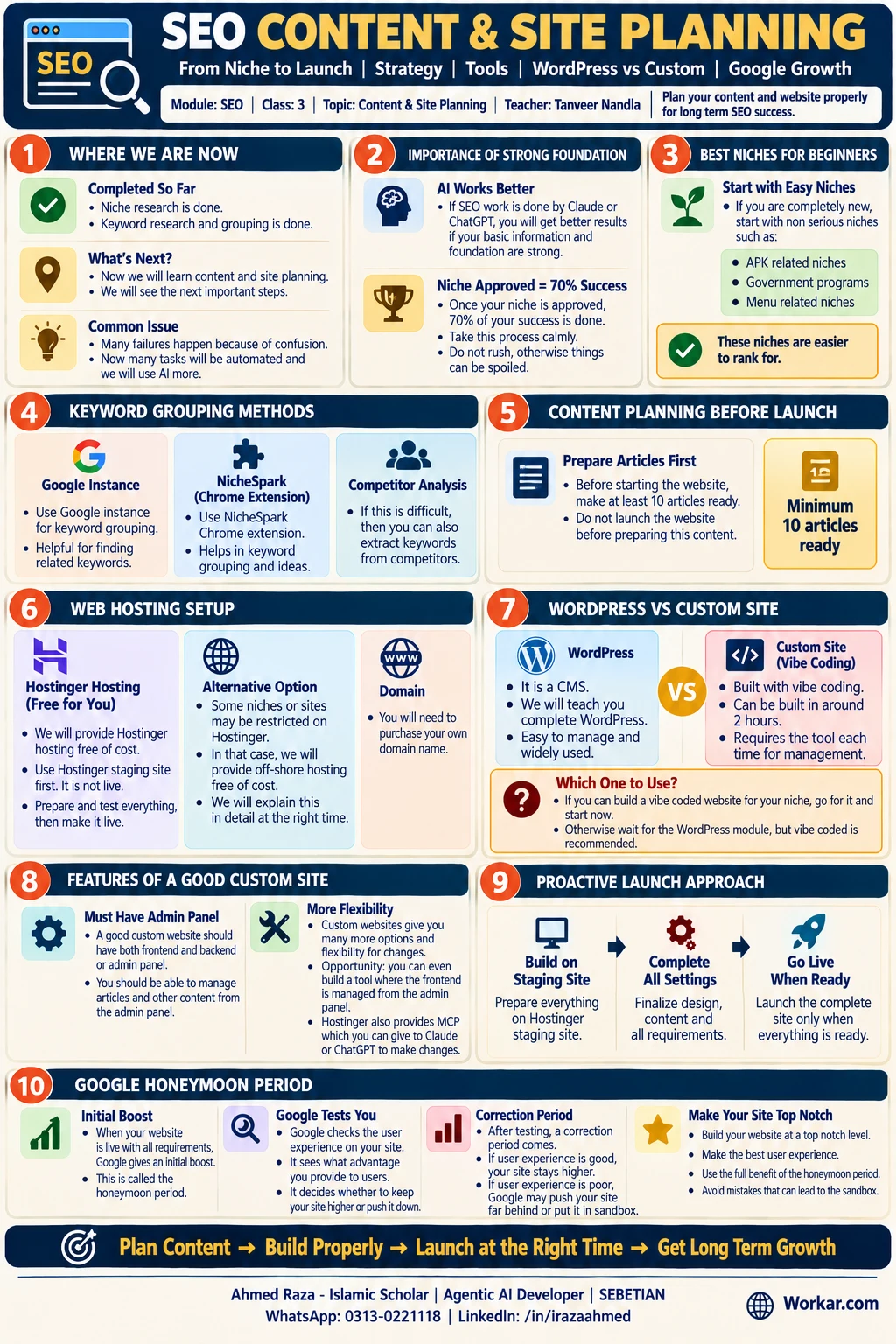 SEO Content and Site Planning Guide, from niche approval through site launchOpen full size
Class infographicTap the image to zoom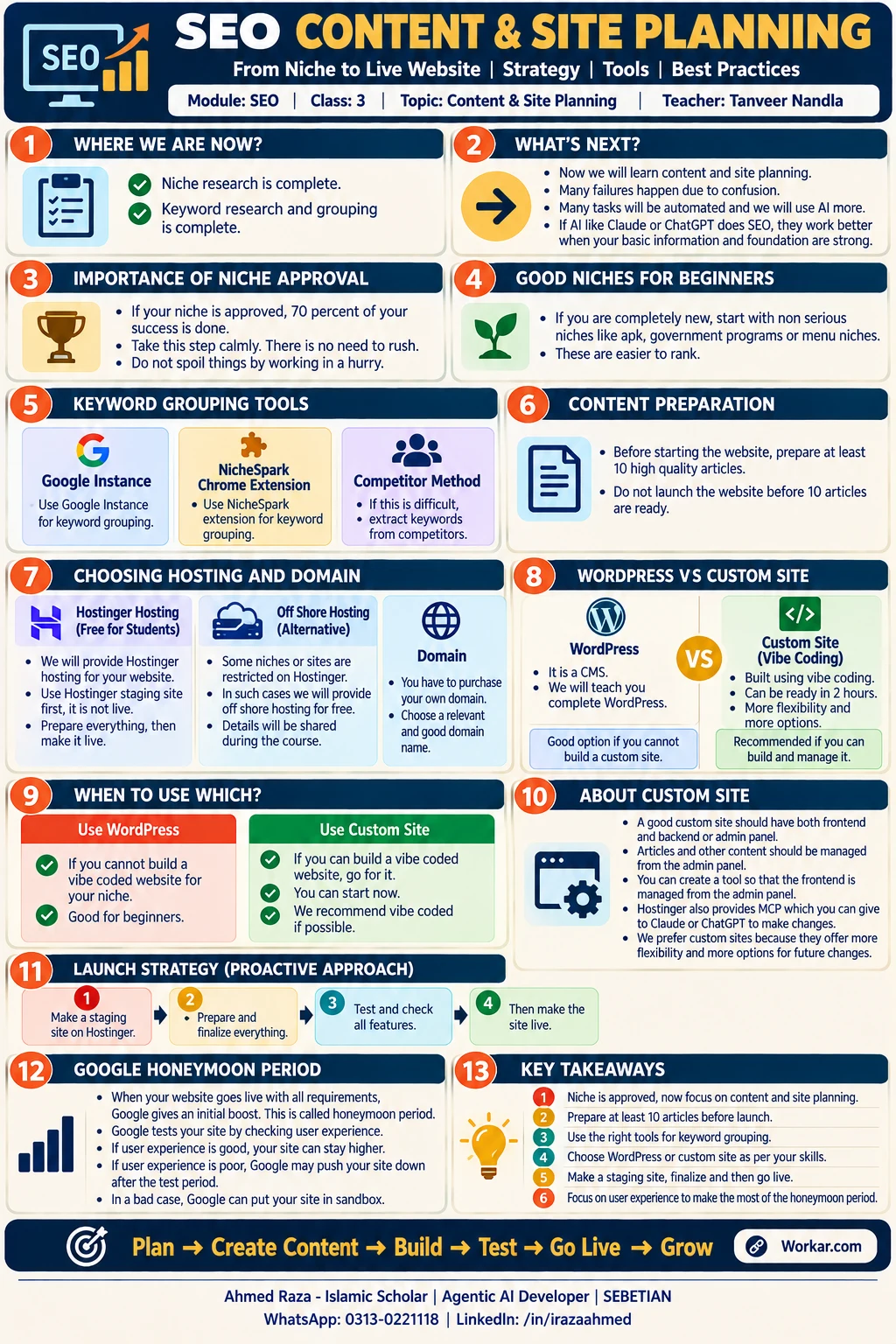 SEO Content and Site Planning Cheat Sheet, covering content preparation, hosting and launchOpen full size
Footnotes
-
iSkills SEO module, "Content & Site Planning," Class 3, taught by Sir Tanveer Nandla; notes supplied by the record's owner on 2026-10-25. ↩ ↩2 ↩3 ↩4 ↩5 ↩6 ↩7 ↩8 ↩9 ↩10 ↩11
-
Google Search Central, "A guide to Google Search ranking systems," checked 2026-10-25. ↩
-
Google Search Central, "Creating helpful, reliable, people-first content," checked 2026-10-25. ↩
-
Google Search Central, "FAQ on crawling and indexing," checked 2026-10-25. ↩
More in this chapter2
- LessonContent coverage and grouping, Class 4: from a keyword list to site structureAmmar Ashfaq's SEO Class 4 on topical coverage, three ways to collect keywords, grouping them by search intent, and deciding which groups earn their own post to form the site structure.Read lesson
- LessonKeyword coverage and grouping, Class 5: keywords in other languagesAmmar Ashfaq's SEO Class 5 on choosing a niche's region and language, building a multilingual site, grouping non-English keywords with GOOGLETRANSLATE, and the minimum volume for a post.Read lesson
Grouping and site structure
Previous Page
Content coverage and grouping, Class 4: from a keyword list to site structure
Ammar Ashfaq's SEO Class 4 on topical coverage, three ways to collect keywords, grouping them by search intent, and deciding which groups earn their own post to form the site structure.