Products to sellLesson 1 of 4
Etsy digital product creation: AI-built planners, Canva templates and listing videos
Sir Zafar's Class 16 on building planners with Gemini and Claude, creating social media templates with AI, generating an Etsy listing video and publishing 10 listings.
- Status
- stable
- Trust
- unverified
This document records Class 16 of the Etsy module, Digital Product Creation and Etsy Listing, taught by Sir Zafar Ali.1
Why planners
According to the class, after Etsy's AI update the best product to sell is the planner.1 This is the instructor's market judgement. The notes do not describe what the AI update changed or give sales data behind the claim, so treat it as advice to test in your own shop.
The planner workflow: Gemini, then Claude
- Pick a competitor planner. Find a planner listing on Etsy and copy its URL. You will give this same URL in the next two steps.
- Ask Gemini for code. Give Gemini the competitor's listing URL with Prompt 1 below. Gemini returns Python code for a better planner.
- Run it in Claude. Paste that Python code into Claude, together with the same listing URL, and give it Prompt 2. Claude returns an Excel spreadsheet.
- Test in Google Sheets. Open the Excel result in Google Sheets and test it properly.
- Thank you card. Put the Google Sheet link inside your thank you card.
- Sell on Etsy. Create the listing with the thank you card and put the planner on sale.1
Use the same Etsy listing URL for both the code and the design.1
Prompt 1, for Gemini (gives you Python code):
Based on the product attached I want you to write a lengthy detailed python piece of code that will provide me a much much better product then one attached, think carefully and provide the best results and also add charts to help visualize the data.Prompt 2, for Claude (gives you the Excel spreadsheet):
run the python code, and provide me the excel spreadsheet.The prompts are reproduced as supplied in the class notes.1 The infographic summarises the testing step as checking every sheet, formula and chart, and describes the thank you card as how the buyer receives the product.2
Note
The notes do not say whether the Google Sheet link should be shared as view only or as a copy link, or what a working planner must contain. Check the file yourself before you list it.
Canva social media post templates
To get product ideas for a social media post template set, give any AI the following prompt. The class example asks for 30 Canva post templates for a premium burger restaurant in New York City.1
social media post templete

i want to create 30 canva post templates for a burger joint in new york city there website is steakmaza.com and the stell meat and burgers and its premium and i am going to need you to crate 30 template for daily for each day of posting, stay by creating the first template post for lay one , let me check it out see if it looks good, then i can give you the ok t move on the next if you have any question about the design feel free to aks
The prompt works one template at a time: the AI makes the first day's template, you check it, and you approve it before it moves on to the next. It may ask you questions about the design.1
Then have ChatGPT or Gemini design the images, and create the listing.1 Replace the burger restaurant details with your own niche when you use the prompt; the notes give it only as the class example.
Listing video with AI
You can also generate the listing video with AI through this prompt.1 Give the AI only two inputs: your product images (minimum 3, maximum 10) and your focus keyword.
Act as an expert Etsy listing video creator.

I will provide only two inputs:

1. Product Images: Minimum 3, maximum 10 images.
2. Focus Keyword: My main Etsy product keyword.

Your Task:

Automatically analyze all uploaded images and the focus keyword, then create a professional, high-quality 5-10 second Etsy listing video.

Automatic Video Requirements:

• Duration: 5-10 seconds.
• Format: 4:3 landscape, Etsy-friendly.
• Resolution: 1920 × 1440.
• Automatically select the best opening image.
• Automatically arrange images in the most attractive sequence.
• Use smooth zoom, pan, and professional transitions.
• Highlight important product details.
• Preserve original product designs, colors, and text.
• Keep every product clearly visible without cropping.
• No music, voiceover, watermark, or unnecessary text.
• No AI morphing, distorted products, or invented features.
• Make the first second visually engaging.
• Finish with the strongest product image.
• Automatically optimize pacing based on the number of uploaded images.
The notes do not name which AI tool should generate the video. Whichever you use, check that the finished video actually meets the requirements in the prompt before uploading it.
Keep it original
The infographic adds two cautions that are not in the class notes. The prompt asks for a better product, not a copy, so never reuse a competitor's text, layout or images; build your own version. Check Etsy's current Creativity Standards, disclose AI use where Etsy asks for it, and test every file before you sell it.2
Assignment
By next week, use this method to publish at least 10 listings of planners and templates.1
Class infographic
Class infographicTap the image to zoom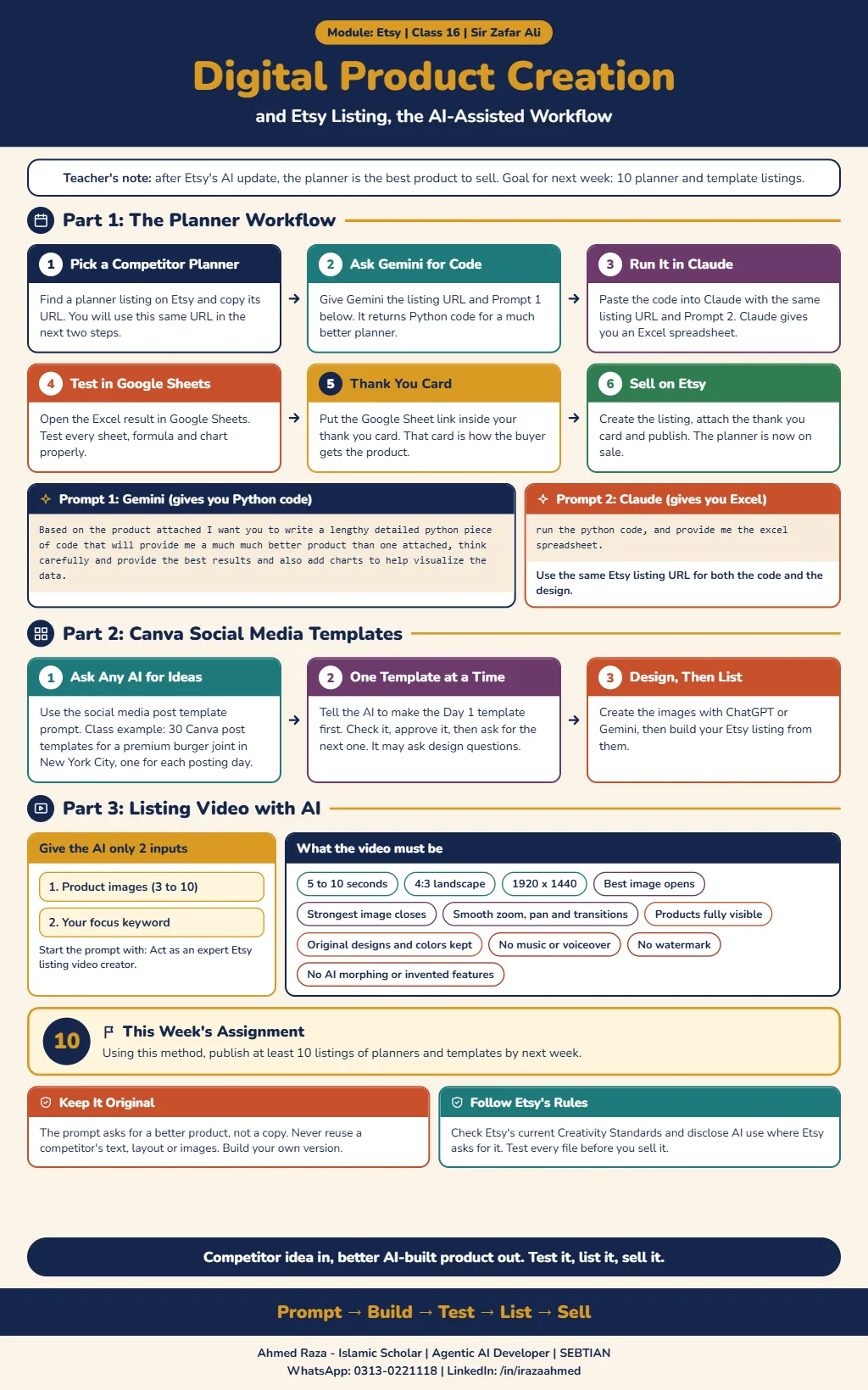 Etsy digital product creation and listingOpen full size
Footnotes
More in this chapter3
- LessonEtsy shop and products: one shop, five listing images and coloring booksSir Zafar's Class 17 on running one Etsy shop for many product types, the listing video and five listing image prompts, and making a coloring book with ChatGPT.Read lesson
- LessonCanva course: design invitation templates and planners for EtsySir Zakria Afzal's Canva class, from custom-size designs and editing tools to AI-assisted invitations, planners, mockups and delivery of editable templates.Read lesson
- LessonPrint on demand on Etsy with Printify: zero investment, nothing to shipSir Zafar's Class 18 on print on demand, linking Printify to Etsy, how an order and its money move, choosing a product and provider, and pricing with a 25 to 30% profit.Read lesson