Products to sellLesson 2 of 4
Etsy shop and products: one shop, five listing images and coloring books
Sir Zafar's Class 17 on running one Etsy shop for many product types, the listing video and five listing image prompts, and making a coloring book with ChatGPT.
- Status
- stable
- Trust
- unverified
This document records Class 17 of the Etsy module, Etsy Shop and Products, taught by Sir Zafar Ali.1
Important
Task: publish at least 10 listings before the next lecture. This is compulsory.1
One shop, many products
Work on multiple projects inside the Etsy shop you already have, and treat it like a mart. One shop can carry digital products, physical products and print on demand products. You do not need multiple shops.1
The infographic gives examples for each type: planners, templates, printables and coloring books as digital products; items you make or stock and ship yourself as physical products; and a partner who prints and ships when a buyer orders as print on demand. It also advises reading Etsy's current seller policy before listing, because physical and print on demand listings have extra Etsy rules.2 The notes do not say which rules those are.
Recap: the listing video prompt
The listing video prompt was given in the last class, in Class 16. Class 17 repeats it with two more paragraphs at the end: one telling the AI not to ask questions, and one asking for a ready-to-use video-generation prompt when direct video generation is not available. The only required inputs are the product images and the focus keyword. Save this prompt in your AI's memory so you can reuse it.1
Act as an expert Etsy listing video creator.

I will provide only two inputs:

1. Product Images: Minimum 3, maximum 10 images.
2. Focus Keyword: My main Etsy product keyword.

Your Task:

Automatically analyze all uploaded images and the focus keyword, then create a professional, high-quality 5-10 second Etsy listing video.

Automatic Video Requirements:

• Duration: 5-10 seconds.
• Format: 4:3 landscape, Etsy-friendly.
• Resolution: 1920 × 1440.
• Automatically select the best opening image.
• Automatically arrange images in the most attractive sequence.
• Use smooth zoom, pan, and professional transitions.
• Highlight important product details.
• Preserve original product designs, colors, and text.
• Keep every product clearly visible without cropping.
• No music, voiceover, watermark, or unnecessary text.
• No AI morphing, distorted products, or invented features.
• Make the first second visually engaging.
• Finish with the strongest product image.
• Automatically optimize pacing based on the number of uploaded images.

Important: Do not ask any questions or request additional information. Automatically make all creative decisions based on the uploaded images and focus keyword.

Final Result: Generate a complete, realistic, professional Etsy listing video designed to attract buyers and improve product presentation. If direct video generation is unavailable, output a ready-to-use video-generation prompt.
Master prompt for five listing images
This prompt asks an AI for five separate square listing images from only two inputs: one reference image of your product and your focus keyword.1 The five images are:
| # | Image | What it shows |
|---|---|---|
| 1 | Main product thumbnail | The product as the dominant visual, a short title, a clean background, readable at thumbnail size |
| 2 | What's included | Only the verified pages, sections or components the buyer receives, with short labels |
| 3 | Key features ("Why you'll love it") | Up to 3 to 5 verified features, each linked to a buyer benefit |
| 4 | Lifestyle mockup | The product in a suitable real setting, with few props that do not look included |
| 5 | How it works | Purchase, download, use, for a confirmed digital download; otherwise "A closer look" |
The prompt's central rule is product accuracy first: the uploaded image is the source of truth, and any detail that cannot be verified is left out rather than invented. It asks for 3000 × 3000 px, 1:1 square images, delivered as five separate files and never as a collage, and it forbids fake reviews, discounts, urgency and claims such as "editable" or "printable" unless they are confirmed.1 The prompt itself notes that 3000 × 3000 px is your requested output, not an Etsy requirement.
Note
The prompt below is reproduced from the class notes. Its long dashes have been written as hyphens; the wording is otherwise unchanged.
Act as an expert Etsy listing image designer, professional e-commerce product photographer, and conversion-focused digital product marketing specialist.

I WILL PROVIDE ONLY TWO INPUTS

1. Product Image: One reference image of my actual product.
2. Focus Keyword: My main Etsy product keyword.

YOUR TASK

Analyze the uploaded product image and focus keyword, then create exactly FIVE separate, unique, professional Etsy listing images.

Make creative decisions automatically. Do not ask questions about design preferences.

Choose suitable layouts, mockups, supporting colors, typography, lighting, and presentation based on the actual product.

PRODUCT ACCURACY COMES FIRST

Treat the uploaded product image as the source of truth.

Distinguish between:
• Details directly visible in the reference.
• Product information explicitly supplied by me.
• Information that cannot be verified.

Only use verified information in headings, labels, and feature claims.

A focus keyword identifies the product category; it does not prove features, compatibility, file formats, dimensions, page counts, or included items.

Do not invent missing information. When a detail is unknown, omit it and continue with a suitable visual presentation.

Do not describe a product as editable, printable, instant download, Canva-compatible, or suitable for particular software unless that information is confirmed.

If the reference is a competitor image, use it only for general inspiration. Do not reproduce its branding, listing artwork, wording, or distinctive design, or present it as my actual product.

AUTOMATIC IMAGE CREATION

IMAGE 1 - MAIN PRODUCT THUMBNAIL

Create a premium, attention-grabbing main listing image that makes the product immediately understandable.

• Make the actual product the dominant visual.
• Use a short, readable product title based naturally on the focus keyword.
• Show one strong, clear product preview.
• Use a realistic mockup only when it accurately represents the product.
• Choose a clean background with strong visual contrast.
• Keep supporting copy minimal.
• Keep the product and essential text comfortably inside the canvas edges.
• Ensure the image remains understandable at a small thumbnail size.
• Avoid excessive badges, tiny text, clutter, or keyword stuffing.
• Do not add unsupported bestseller, review, discount, or sales claims.

OUTPUT:
Deliver Image 1 as ONE complete, independent 3000 × 3000 px image.


IMAGE 2 - WHAT'S INCLUDED

Create an organized presentation of the contents buyers actually receive.

Heading: "WHAT'S INCLUDED"

• Display only verified product pages, sections, components, or details.
• Use authentic previews extracted from the provided product image where suitable.
• Add short, accurate labels.
• Arrange previews with consistent spacing and a clear visual hierarchy.
• Clearly distinguish included items from decorative props.
• Do not duplicate one page to imply that multiple different pages are included.
• Do not invent additional pages, bonuses, formats, sizes, or features.
• If only one product view is available, show that view with accurate detail enlargements. Do not imply those enlargements are separate included items.

OUTPUT:
Deliver Image 2 as ONE complete, independent 3000 × 3000 px image.


IMAGE 3 - KEY FEATURES

Create a clean, visually attractive product features infographic.

Heading: "WHY YOU'LL LOVE IT"

• Display a large, accurate product preview.
• Add up to 3-5 relevant, verified feature highlights.
• Use fewer highlights if the reference does not support enough factual claims.
• Use simple icons and readable typography.
• Connect each verified feature to a practical buyer benefit.
• Avoid guaranteed outcomes or unsupported claims.
• Do not claim medical benefits, guaranteed productivity, financial results, or other unverified outcomes.
• Keep the composition spacious and easy to scan.

OUTPUT:
Deliver Image 3 as ONE complete, independent 3000 × 3000 px image.


IMAGE 4 - LIFESTYLE MOCKUP

Create a realistic lifestyle presentation showing an appropriate context for the product.

Heading: Use a short, relevant heading only if it improves clarity.

• Choose a setting that suits the product and its intended use.
• Keep the actual product as the main subject.
• Preserve its original design, colors, proportions, and visible content.
• Use natural-looking lighting, shadows, and perspective.
• Add only a small number of relevant supporting props.
• Ensure props do not imply that additional items are included.
• Do not depict unsupported software functionality or invent unseen product pages.
• For a confirmed digital product shown on a device or as a printout, add a discreet clarification where needed:
  "Digital product - device and props not included."
• Do not imply that a physical item is shipped when the product is digital.
• Use supplied product artwork directly when possible instead of regenerating its contents.

OUTPUT:
Deliver Image 4 as ONE complete, independent 3000 × 3000 px image.


IMAGE 5 - HOW IT WORKS

Create a simple visual guide explaining the verified purchase-to-use process.

Heading: "HOW IT WORKS"

For a confirmed digital download, use a suitable three-step structure:

Step 1: Purchase Your Digital Product.
Step 2: Download Your Files.
Step 3: Start Using Your Product.

Adapt Step 3 only when the required action is verified:
• Edit your template.
• Print your pages.
• Open in the compatible app.
• Use your digital file.

• Use professional icons and a clear reading order.
• Include "DIGITAL DOWNLOAD - NO PHYSICAL ITEM" only when the product is confirmed as digital.
• Mention software compatibility, account requirements, editing access, and printing options only when verified.
• Do not invent delivery methods, template links, or download instructions.
• If the delivery process is unknown, use "A CLOSER LOOK" instead and create an accurate detail presentation using the actual product.

OUTPUT:
Deliver Image 5 as ONE complete, independent 3000 × 3000 px image.


GLOBAL IMAGE REQUIREMENTS

• Generate exactly FIVE separate images.
• Target dimensions: 3000 × 3000 pixels per image.
• Aspect ratio: 1:1 square.
• These dimensions are my requested output specification, not a statement of Etsy's mandatory requirements.
• Maintain consistent branding across all five images.
• Use a complementary palette that supports the original product.
• Use attractive, readable typography with strong contrast.
• Keep headlines short and easy to read on mobile.
• Keep essential content away from the edges to allow for thumbnail cropping.
• Use authentic product previews and realistic presentation.
• Preserve the original product colors, layout, proportions, and content.
• Keep the complete primary product preview visible.
• Detail enlargements may show selected areas, but must clearly function as close-ups.
• Do not add third-party watermarks or invented brand logos.
• Do not remove watermarks from third-party reference material.
• Do not invent reviews, ratings, testimonials, certifications, awards, or sales figures.
• Do not add false urgency, fabricated discounts, or unsupported guarantees.
• Do not show blurry, distorted, or illegible text.
• Do not invent features, product pages, or included items.
• Do not include misleading product information.
• Do not claim the images guarantee Etsy approval, ranking, clicks, or sales.


STRICT SEPARATE-IMAGE RULE

YOU MUST NOT:

• Combine all five listing images into one image.
• Create a collage containing the five finished listing designs.
• Create a five-panel layout.
• Create a contact sheet.
• Divide one square image into five listing designs.
• Place all five finished listing designs on one canvas.
• Generate one image showing previews of the other four listing images.
• Deliver one combined image instead of five individual files.

Multiple actual product previews may appear inside Image 2 when needed to explain the contents. This does not permit combining the five finished listing images.

YOU MUST:

• Generate Image 1 as a complete, standalone square image.
• Generate Image 2 as a complete, standalone square image.
• Generate Image 3 as a complete, standalone square image.
• Generate Image 4 as a complete, standalone square image.
• Generate Image 5 as a complete, standalone square image.
• Keep each image independently usable as an Etsy listing image.
• Maintain one consistent visual identity across the set.
• If the tool supports only one image per generation, generate the images sequentially.
• Never substitute a collage because separate-image generation is inconvenient.


FINAL QUALITY CHECK

Before delivery, inspect every image and confirm:

1. The product matches the supplied reference.
2. All claims are supported by the supplied information.
3. Spelling and punctuation are correct.
4. Headlines remain readable at thumbnail size.
5. Text and essential product details have comfortable margins.
6. No product artwork is unintentionally distorted.
7. Decorative props do not misrepresent included items.
8. All five outputs are separate files.
9. Actual pixel dimensions have been checked when tools permit.

If a check fails, correct the affected image before delivery.


FINAL OUTPUT - FIVE SEPARATE FILES

File 1:
Etsy_Listing_Image_01_Main_Thumbnail.png

File 2:
Etsy_Listing_Image_02_Whats_Included.png

File 3:
Etsy_Listing_Image_03_Key_Features.png

File 4:
Etsy_Listing_Image_04_Lifestyle_Mockup.png

File 5:
Etsy_Listing_Image_05_How_It_Works.png

If Image 5 uses the alternative detail presentation, name it:
Etsy_Listing_Image_05_A_Closer_Look.png


CAPABILITY FALLBACK

If direct image creation is available, create the five images.

If direct image creation is unavailable, provide five separate, detailed, ready-to-use image-generation prompts, one for each image. Clearly state that these are prompts, not completed image files.

If exact 3000 × 3000 px export is unavailable, use the highest supported square resolution and state the actual dimensions. Do not claim an unsupported resolution or stretch the image.

ONLY REQUIRED INPUTS:
PRODUCT IMAGE + FOCUS KEYWORD.
The notes do not name which AI tool should run this prompt. Whichever you use, check each image against the prompt's own final quality check before you upload it.
The coloring book method
- Search Google for coloring book chatGPT. The first result is the ChatGPT coloring book GPT; open it.
- Give it an Etsy coloring book listing's screenshot, URL and title, and ask it for a prompt to make that book.
- Paste that prompt into a new chat and have it generate the pictures.
- Complete the whole book, make it into one PDF file, and list it for sale.1
The notes do not say how many pages a book should have, or which page size to use for the PDF.
Keep it original
The infographic adds cautions that are not in the class notes. Use a competitor's listing only to understand the niche and style; do not copy its pages, title, wording or characters, and avoid trademarked characters and brand names. Check Etsy's current Creativity Standards, disclose AI use where Etsy asks for it, and check every page for mistakes before you sell.2
Class infographic
Class infographicTap the image to zoom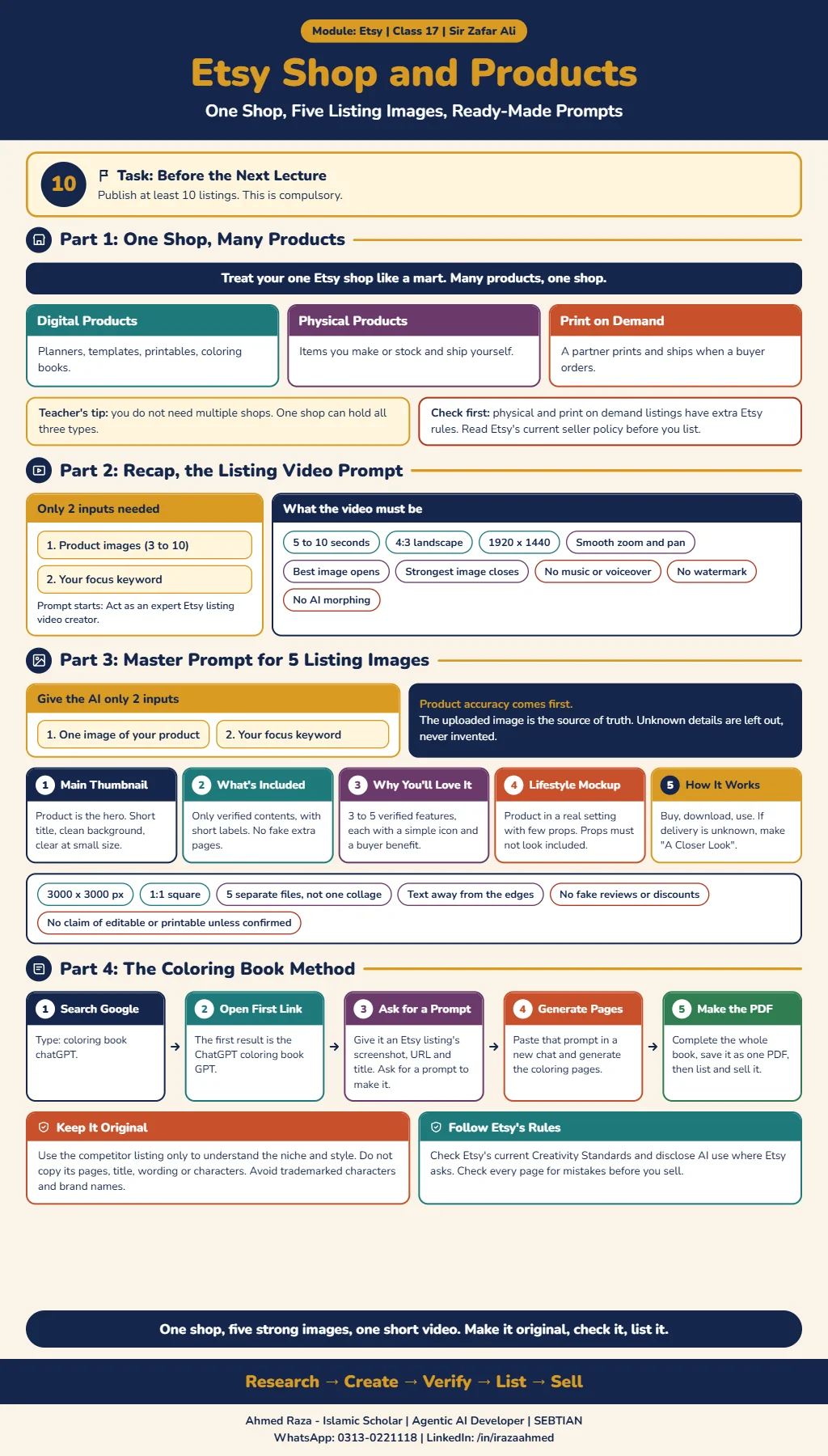 Etsy shop and productsOpen full size
Footnotes
More in this chapter3
- LessonEtsy digital product creation: AI-built planners, Canva templates and listing videosSir Zafar's Class 16 on building planners with Gemini and Claude, creating social media templates with AI, generating an Etsy listing video and publishing 10 listings.Read lesson
- LessonCanva course: design invitation templates and planners for EtsySir Zakria Afzal's Canva class, from custom-size designs and editing tools to AI-assisted invitations, planners, mockups and delivery of editable templates.Read lesson
- LessonPrint on demand on Etsy with Printify: zero investment, nothing to shipSir Zafar's Class 18 on print on demand, linking Printify to Etsy, how an order and its money move, choosing a product and provider, and pricing with a 25 to 30% profit.Read lesson
Etsy digital product creation: AI-built planners, Canva templates and listing videos
Sir Zafar's Class 16 on building planners with Gemini and Claude, creating social media templates with AI, generating an Etsy listing video and publishing 10 listings.
Canva course: design invitation templates and planners for Etsy
Sir Zakria Afzal's Canva class, from custom-size designs and editing tools to AI-assisted invitations, planners, mockups and delivery of editable templates.